Framer Hosting Plans and How to Choose One

So, you’ve got your gorgeous new Framer site ready to go, you’re hyped to share it with the world… and then Framer hits you with a question:
👉 “Which hosting plan do you want?”
Cue the blank stare. 😅
But don’t worry, this guide breaks down exactly what each plan includes, who it’s for, and how to choose the right one without overthinking it (or overpaying).
First Things First…What Is Hosting?
Hosting = where your website lives.
Think of your website like a cute little boutique, and hosting is the building that keeps it open, safe, and running 24/7. Without hosting, your site doesn’t exist online. Simple as that.
Framer offers built-in hosting, which means you don’t need to deal with third-party services like Bluehost, Siteground, or whatever nightmare combo WordPress made you Google at 2am.
Framer Hosting Plans: The Breakdown
As of now, February 2026, Framer offers three plans (plus a free option if you’re just playing around or publishing to a Framer subdomain).
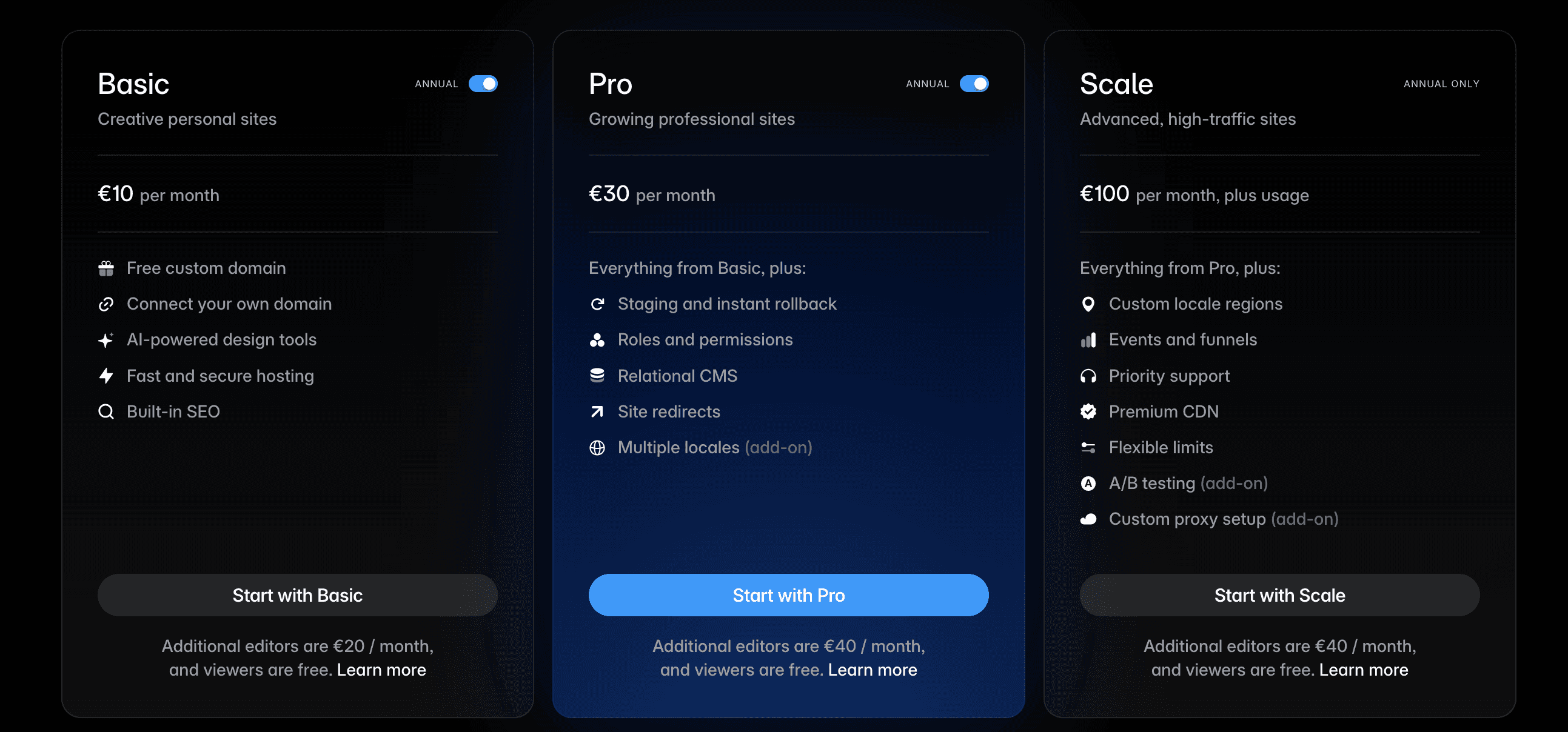
Here’s what you need to know:
🆓 Free Plan
Use a Framer subdomain (yourname.framer.website)
No custom domain connection
Watermarked
Great for testing, and even for you if you're just starting out.
🌱 Basic Plan – €15/mo
Best for: Most service-based businesses, freelancers, and creators.
Custom domain connection
Free .com included on yearly
Up to 30 site pages
1 CMS collection (so you can blog, post case studies, etc.)
Up to 1000 CMS items
10GB of bandwidth usage
Basic analytics
Fast hosting with automatic SSL (we want this)
💡 This is the plan I recommend for small-ish clients. You get everything you need to run your business online, minus the overwhelm.
🚀 Pro Plan – €30/mo
Best for: Agencies, bigger companies, or sites that update frequently and need more advanced features.
Everything in Basic plus:
Staging and instant rollback
Relational CMS (when you have a collection for podcast guests por example and another for the podcast episodes and you can link them together)
Site redirects
Up to 150 site pages
Up to 10 CMS collections
Up to 2500 CMS items
100GB bandwidth usage
💡 If you’re running an agency site, a company or a high-volume blog, this plan might be worth the upgrade. This is the one most of my clients need.
🚀 Scale Plan – €100/mo
Best for: you guessed it, BIG companies with marketing funnels and lots of crazy amazing things.
So... Which Plan Should You Pick?
Depends on the content on your site…
Do you need more than 1 CMS collection? For example for Case studies AND Blog posts for SEO… Get the Pro Plan.
You're a new freelancer? Get the Basic Plan
Don't overthink it. You can always start small and upgrade later, Framer makes it easy to switch plans.
Bonus: Free Hosting for NGOs
If you're a registered NGO they're working on an option to provide you with free hosting, in the meantime you can reach out to them (or I'll do that for you if we work together) to get it done.
Final Thoughts: Pick What Supports Your Growth
Hosting isn’t just about being online, it’s about making sure your site can keep up with you as your business grows.
If you’re not sure which plan is right or you need help connecting your domain, setting up your CMS, or getting your first blog post published, you know where to find me. ✨